
The
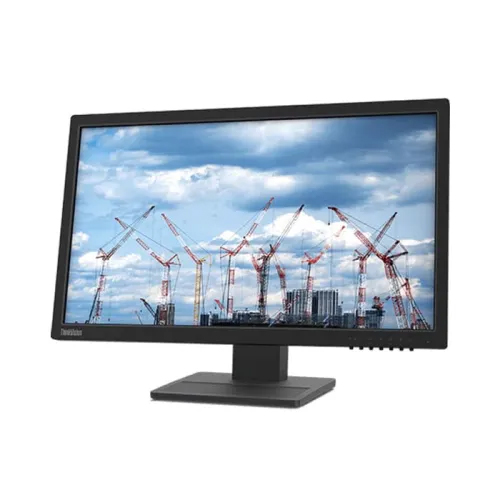
Lenovo ThinkVision E22-28 is a 21.5-inch IPS FHD monitor designed for professional use in the office or at home. With a resolution of 1920 x 1080, this monitor provides a clear and vibrant display, making it an excellent choice for tasks such as content creation, photo and video editing, and gaming.
One of the standout features of this monitor is its IPS panel technology, which offers wider viewing angles and better color accuracy than traditional TN panels. This makes it ideal for tasks that require accurate color reproduction, such as graphic design or video editing. The monitor also has a 99% sRGB color gamut, which means it can display a wide range of colors, making it an excellent choice for creative professionals.
In terms of connectivity, the Lenovo ThinkVision E22-28 has a variety of options. It features HDMI, VGA, and DisplayPort inputs, as well as a built-in USB hub with two USB 3.0 ports. This allows users to connect multiple devices and peripherals, such as a keyboard and mouse, to the monitor.
The monitor also has several built-in features to enhance productivity and comfort. It has a low blue light mode, which reduces the amount of blue light emitted by the screen, making it easier on the eyes and reducing eye strain. It also has a flicker-free display, which eliminates screen flicker and further reduces eye strain.
Additionally, the Lenovo ThinkVision E22-28 has an adjustable stand that allows users to tilt, swivel, and adjust the height of the monitor for optimal viewing comfort. The stand is also VESA mount compatible, so it can be easily mounted to a wall or arm.
Pleasant Viewing Experience
The ThinkVision E22-21.5-inch 28's In-Plane Switching Panel provides clear images with Full-HD quality and wide viewing angles. The monitor's minimal eye fatigue is indicated by the TÜV Rheinland Eye Comfort certification. Enjoy vibrant pictures with a 72% NTSC color gamut and 16.7 million supported colors.
Improvements in Connectivity
The ThinkVision E22-28 is not only aesthetically pleasing and ergonomic but also useful. Through the HDMI, DP, and VGA connectors, it is compatible with the majority of devices, boosting performance and productivity. Thanks to the monitor's built-in speakers, online meetings are more effective and convenient with higher-quality conversations.
Efficient Use of Workspace
Users can adjust the monitor to their preferences, reducing neck and back aches and strains, with a raising range of 155 mm, tilt angles of -5°/22°, swivel angles of -360°/360°, and a pivot range of 90°. The 62B9MAR4WW may easily be attached to a wall using the VESA Mount, giving your workplace a tidy, professional appearance.