







Your compare list is empty!

Compare Product (0)
closeYour compare list is empty!
YOUR CART
closeYour shopping cart is empty!
| Material | PVC+PCB+LCP+GF |
| Weight | 0.15kg |
| Dimension | 121×18×143(L×W×H) |
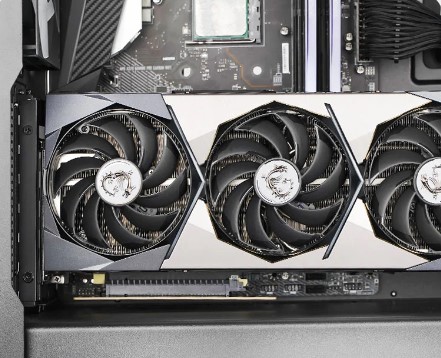
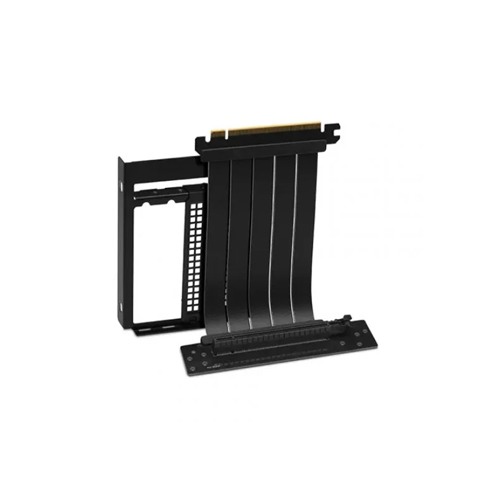
The Deepcool PCIe 4.0 Vertical GPU Bracket is a cutting-edge accessory designed to transform your PC build by allowing you to vertically mount your graphics card. This bracket not only adds a touch of elegance and uniqueness to your system but also enhances the overall cooling performance of your GPU.One of the standout features of this bracket is its compatibility with PCIe 4.0, the latest generation of the PCIe interface. This means you can take full advantage of the increased bandwidth and data transfer speeds offered by PCIe 4.0 graphics cards, ensuring that your GPU operates at peak performance for gaming, content creation, and more.Vertical GPU mounting provides several benefits. Firstly, it puts your graphics card on display, showcasing its design and RGB lighting, turning it into a visual centerpiece of your build. This is especially appealing for users who invest in high-end, aesthetically pleasing GPUs.Additionally, vertical mounting can help improve GPU cooling. With the graphics card oriented vertically, it allows for better airflow around the card, reducing heat buildup and potentially resulting in lower temperatures. This can be particularly beneficial for graphics cards with elaborate cooling solutions or in cases with limited airflow.Installation is made easy with the Deepcool PCIe 4.0 Vertical GPU Bracket. It comes with comprehensive instructions and the necessary hardware, simplifying the process even for users who may not be seasoned PC builders.Moreover, the bracket is designed to support various graphics card sizes and weights, ensuring compatibility with a wide range of GPUs.
The bracket provides a means to reposition your graphics card, converting the traditional horizontal orientation into a vertical one, giving your PC build a unique and modern appearance. However, it's important to note that while vertical mounting can enhance aesthetics and possibly improve thermals in some cases, it might not be suitable for all PC configurations, as it could affect thermals negatively in certain setups due to altered airflow dynamics.Overall, the DeepCool PCIe 4.0 Vertical GPU Bracket offers a sturdy and compact solution for users seeking to showcase their graphics card vertically, adding a touch of style and potentially optimizing airflow within their PC builds.
Showcase your GPU vertically and eliminate any concern of a heavy graphics card potentially damaging your motherboard.
Improve the connection stability across the PCIe cable with EMI shielding that protects against electromagnetic interference for a seamless experience.
he adapter wire is thin and pliable for easy adjustments to fit in your case at any angle.
High quality soldered contacts increase conductivity for better signal integrity while also providing extra durability and longevity.
The DeepCool PCIe 4.0 Vertical GPU Bracket offers a simple solution for vertically mounting your graphics card, enhancing the visual appeal of your PC build. Crafted with durable materials, it ensures stability for your GPU. While it adds an aesthetic edge and potential airflow improvement, its impact on temperatures varies by case and GPU design. Some users might experience better cooling, while others may encounter marginal changes or even increased temperatures.
The DeepCool PCIe 4.0 Vertical GPU Bracket offers a simple solution for vertically mounting your graphics card, enhancing the visual appeal of your PC build. Crafted with durable materials, it ensures stability for your GPU. While it adds an aesthetic edge and potential airflow improvement, its impact on temperatures varies by case and GPU design. Some users might experience better cooling, while others may encounter marginal changes or even increased temperatures.
Gigabyte
Gigabyte
Gigabyte
Transcend
Gigabyte
 2 Reviews
Gigabyte
Gigabyte
Gigabyte
Transcend
Gigabyte
Gigabyte

 Facebook
 WhatsApp

