
Menu
Your Cart

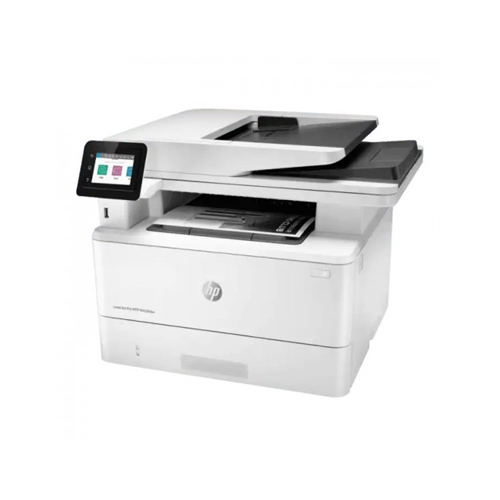
HP LaserJet Pro MFP M428fdw Multi Function Laser Printer

HP LaserJet Pro MFP M428fdw Multi Function Laser Printer
Out Of Stock
HP LaserJet Pro MFP M428fdw Multi Function Laser Printer
  • Stock: Out Of Stock
  • Model: MFP M428fdw
0৳
Key Features
  • Scan Resolution: 1200 x 1200dpi
  • Printer Type: Multi Function Mono Laser Printer
  • Functions: Print, Scan, Copy, Fax
  • Memory: 512MB
Specification
General
Functions Print, Scan, Copy, Fax
Output Color Black & White
Printer Type Multi Function Mono Laser Printer
Paper Information
Input Capacity 350Sheets (Tray 1: up to 100 sheets; Tray 2: up to 250 sheets)
Output Capacity 150Sheets
ADF: Yes (50 sheets)
Paper Size A4, A5, A6, B5 (JIS), Oficio (216 x 340 mm), 16K (195 x 270 mm), 16K (184 x 260 mm), 16K (197 x 273 mm), Japanese Postcard, Double Japan Postcard Rotated, Envelope #10, Envelope Monarch, Envelope B5, Envelope C5, Envelope DL
Paper Type Paper (plain, EcoEFFICIENT, light, heavy, bond, colored, letterhead, preprinted, prepunched, recycled, rough), envelopes, labels
Paper Weight 16 to 46.6 lb
Scan
Scan Resolution 1200 x 1200dpi
Scan Type 29ppm (B), 20ppm (C)
Technical Specs
Display 2.7 Inch (6.86 cm) intuitive color touchscreen (CGD)
Memory 512MB
Power Consumption 110-volt input voltage: 110 to 127 VAC (+/- 10%), 50/60 Hz (+/- 2 Hz), 220-volt input voltage: 220 to 240 VAC (+/- 10%), 50/60 Hz (+/- 2 Hz), 510 watts (active printing), 7.5 watts (ready), 0.9 watts (sleep)
Processor 1200MHz
Print
Duplex Yes
Duty Cycle up to (Yield) 80000 Pages
First Print Out Time As fast as 6.1 sec
Print Resolution Resolution (black): Fine Lines (1200 x 1200 dpi)
Resolution technology: HP FastRes 1200, HP ProRes1200, Economode
Print Speed Up to 40 ppm (default)
Up to 42 ppm (HP High Speed)
Technology Laser
Copy
Copy Resolution 600 x 600dpi
Copy Speed 38cpm
Physical Specification
Colors White
Dimension 420 x 323 x 390mm
Weight 12.6Kg
Connectivity LAN: Gigabit Ethernet 10/100/1000BASE-T network
Wi-Fi: 802.3az(EEE); 802.11b/g/n/2.4/5 GHZ Wi-Fi radio
USB
1x Hi-Speed USB 2.0
1x rear host USB
1x Front USB port
Warranty Information
Warranty 1 Year
Description

HP LaserJet Pro MFP M428fdw Multi Function Laser Printer

The HP LaserJet Pro MFP M428fdw is a multi-function laser printer designed to meet the printing, scanning, copying, and faxing needs of small to medium-sized businesses. With its compact size and sleek design, it can easily fit into any office setting.

This printer has a printing speed of up to 40 pages per minute, which is ideal for high-volume printing jobs. It also offers automatic duplex printing, which saves time and paper. The printer produces sharp and clear prints with a maximum resolution of 4800 x 600 dpi. Its 250-sheet input tray and 100-sheet multipurpose tray can handle a wide range of paper sizes and types, including envelopes, labels, and cardstock.

In addition to printing, the HP LaserJet Pro MFP M428fdw offers scanning, copying, and faxing capabilities. Its 50-sheet automatic document feeder allows for quick and efficient scanning and copying of multi-page documents. The scanner offers a maximum resolution of 1200 x 1200 dpi and supports multiple scan-to options, including email, USB, network folders, and cloud storage services such as Google Drive and Dropbox.

The printer’s fax function offers a transmission speed of up to 33.6 kbps, and it supports PC faxing, auto-reduction, delayed sending, and forwarding. The printer also offers security features such as PIN printing, secure boot, and secure erase.

The HP LaserJet Pro MFP M428fdw can be easily connected to a network via Ethernet, Wi-Fi, or NFC, making it easy to print from a range of devices, including smartphones, tablets, and laptops. The printer also supports mobile printing through HP Smart app, Apple AirPrint, Google Cloud Print, and Mopria Print Service.

This printer is energy efficient and has an Energy Star certification. It comes with a 3.0-inch color touchscreen display that makes it easy to navigate and customize settings. The printer is compatible with both Windows and Mac operating systems.

Quick Compare

Quick Compare

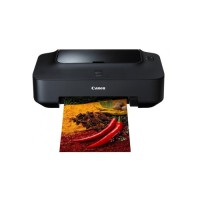
Comparison of MFP M428fdw vs ZKP5808 vs iP 2770 vs DeskJet Ink Advantage 2336 which are most simmiler.
Product HP LaserJet Pro MFP M428fdw Multi Function Laser Printer ZKTeco ZKP5808 Portable Thermal POS Printer Canon Pixma iP 2770 Inkjet Printer HP DeskJet Ink Advantage 2336 All-in-One Color Printer
Image HP LaserJet Pro MFP M428fdw Multi Function Laser Printer ZKTeco ZKP5808 Portable Thermal POS Printer Canon Pixma iP 2770 Inkjet Printer HP DeskJet Ink Advantage 2336 All-in-One Color Printer
Price 0৳ 5,500৳ 5,190৳ 11,200৳ 8,400৳ 9,000৳ 9,500৳
Model MFP M428fdw ZKP5808 iP 2770 DeskJet Ink Advantage 2336
Brand HP ZKTeco Canon HP
Availability Out Of Stock In Stock In Stock In Stock
Rating
Based on 1 reviews.

Based on 0 reviews.

Based on 1 reviews.

Based on 0 reviews.
Summary HP LaserJet Pro MFP M428fdw Multi Function Laser PrinterThe HP LaserJet Pro MFP M428fdw is a multi-function laser printer designed to meet the printing, scanning, copying, and faxing needs of small to medium-sized businesses. With its compact size and sleek design, it can easily fit into any office setting.This printer has a printing speed of up to 40 pages per minute, which is ideal for high-volume printing jobs. It also offers automatic duplex printing, which saves time and paper. The printer produces sharp and clear prints with a maximum resolution of 4800 x 600 dpi. Its 250-sheet input tray and 100-sheet multipurpose tray can handle a wide range of paper sizes and types, including envelopes, labels, and cardstock.In addition to printing, the HP LaserJet Pro MFP M428fdw offers scanning, copying, and faxing capabilities. Its 50-sheet automatic document feeder allows for quick and efficient scanning and copying of multi-page documents. The scanner offers a maximum resolution of 1200 x 1200 dpi and supports multiple scan-to options, including email, USB, network folders, and cloud storage services such as Google Drive and Dropbox.The printer’s fax function offers a transmission speed of up to 33.6 kbps, and it supports PC faxing, auto-reduction, delayed sending, and forwarding. The printer also offers security features such as PIN printing, secure boot, and secure erase.The HP LaserJet Pro MFP M428fdw can be easily connected to a network via Ethernet, Wi-Fi, or NFC, making it easy to print from a range of devices, including smartphones, tablets, and laptops. The printer also supports mobile printing through HP Smart app, Apple AirPrint, Google Cloud Print, and Mopria Print Service.This printer is energy efficient and has an Energy Star certification. It comes with a 3.0-inch color touchscreen display that makes it easy to navigate and customize settings. The printer is compatible with both Windows and Mac operating systems... ZKTeco ZKP5808 Portable Thermal POS PrinterThe ZKTeco ZKP5808 Portable Thermal POS Printer is a compact and efficient thermal printing solution designed for high-performance point-of-sale (POS) systems. Engineered to meet the needs of mobile and on-the-go businesses, this printer is lightweight, weighing only 450 grams, and offers exceptional portability without compromising on functionality. The printer boasts a print speed of 90 mm/sec, ensuring rapid and high-quality receipts with minimal wait time. This thermal printer supports a 48mm print width and utilizes ESC/POS command sets for seamless integration with a variety of POS systems. It can print characters in 12x24 or 24x24 fonts, and has a total of 384 dots per line, delivering sharp and clear text. It’s also capable of printing QR codes and barcodes, making it highly versatile for modern retail and service environments. One of the standout features of the ZKP5808 is its auto-cutter functionality, which automatically cuts receipts after printing, improving efficiency and workflow. The printer also includes built-in auto-sleep and auto-awake capabilities, ensuring energy-saving when not in use, and longer battery life with a 7.4V DC 1500mAh battery that can last up to 4-5 days on standby, with continuous printing capability for up to 120 receipts when fully charged. With compatibility across Windows, Android, and iOS platforms, the ZKTeco ZKP5808 can easily interface with a wide range of devices. The external charging mode (9V/1.5A) ensures quick recharging, making this printer ideal for busy environments where downtime needs to be minimized. It is also designed for use in a variety of conditions, with the ability to function in temperatures ranging from -10°C to 50°C and humidity levels from 10% to 90%. Backed by a 1-year warranty, the ZKTeco ZKP5808 provides reliable, efficient, and mobile thermal printing that meets the demands of modern POS transactions.ZKTeco ZKP5808 Portable Thermal POS Printer FeaturesHigh-Speed Printing: With a print speed of 90 mm/sec, it ensures quick and efficient printing of receipts and other documents.Auto-Cutter: The printer is equipped with an auto-cutter that automatically cuts printed receipts, improving workflow and productivity.Low Noise: Despite its high-speed printing, the ZKP5808 operates with minimal noise, ensuring a quieter work environment.Compatibility: It supports multiple platforms, including Windows, Android, and iOS, making it versatile and easy to integrate with various POS systems.Support for QR Codes and Barcodes: The printer can print both QR codes and barcodes, providing versatility for modern retail and service applications.Battery-Powered: It features a 7.4V DC/1500mA battery that allows for 4-5 days of standby time and can print up to 120 receipts on a full charge, making it ideal for mobile and on-the-go use.Compact and Lightweight: Weighing only 450 grams and with dimensions of 105 x 75 x 45 mm, the ZKP5808 is highly portable and easy to carry around.Durability: The printer is designed to operate in a range of conditions, with an operational temperature range of -10°C to 50°C and humidity tolerance of 10% to 90%.High-Quality Printing: With a 384-dot/line resolution and support for multiple character sizes and fonts, it ensures crisp and clear text for receipts and other printed materials.Energy-Saving Features: Equipped with auto-sleep and auto-awake functions, the printer conserves battery life when not in use.External Charging: The printer can be charged via an external 9V/1.5A charger, ensuring quick recharging between uses.Warranty: The ZKTeco ZKP5808 comes with a 1-year warranty, offering added peace of mind... Canon Pixma iP 2770 Inkjet PrinterThe Canon Pixma iP2770 Inkjet Printer is a popular, affordable printer designed for everyday home use. It offers high-quality printing at a low cost, making it a great choice for students, families, and anyone who needs to print documents or photos on a regular basis.One of the standout features of the Pixma iP2770 is its compact size and sleek design. It measures just 445 x 250 x 130mm and weighs only 3.4kg, making it easy to place on a desk or table without taking up too much space. The printer also has a stylish, glossy finish that looks great in any setting.In terms of printing capabilities, the Pixma iP2770 is a reliable performer. It uses FINE (Full-photolithography Inkjet Nozzle Engineering) technology to produce high-quality prints with sharp, clear text and vibrant colors. The printer has a maximum resolution of 4800 x 1200 dpi, which means it can produce detailed and precise prints even for small text and fine details.The Pixma iP2770 is also versatile when it comes to paper handling. It can print on a range of media types, including glossy photo paper, matte paper, and even printable CDs and DVDs. The printer can handle paper sizes up to A4, and it has a maximum print speed of 7 pages per minute for monochrome prints and 4.8 pages per minute for color prints.One of the downsides of the Pixma iP2770 is that it does not have wireless connectivity. Instead, it connects to a computer via a USB 2.0 interface. This means that users must have a computer with a USB port in order to print from the Pixma iP2770. However, this is a minor inconvenience for most users, as the printer is primarily designed for home use... HP DeskJet Ink Advantage 2336 All-in-One Color PrinterThe HP DeskJet Ink Advantage 2336 is an all-in-one color printer designed for home and small office use. It is a compact and affordable printer that can handle all your printing, scanning, and copying needs.With a print resolution of up to 4800 x 1200 dpi, this printer delivers high-quality prints with sharp text and vibrant colors. It uses two ink cartridges – black and tri-color – to produce both black and white and color documents. The printer also supports borderless printing, which means you can print photos without any white borders.The HP DeskJet Ink Advantage 2336 is also a capable scanner. It has a flatbed scanner that can handle documents up to 216 x 297 mm in size, and it can scan at resolutions of up to 1200 x 1200 dpi. The scanner also supports color scanning, so you can scan color photos and documents with ease.In addition to printing and scanning, the HP DeskJet Ink Advantage 2336 can also make copies. It has a copy resolution of up to 600 x 300 dpi for black and white documents, and up to 600 x 300 dpi for color documents. The printer can also make up to 9 copies at a time, which is useful for small office or home use.The HP DeskJet Ink Advantage 2336 is a very user-friendly printer. It has a simple control panel with intuitive buttons and LED indicators. The printer also comes with HP Smart app, which allows you to print, scan, and copy from your smartphone or tablet. The app is available for both iOS and Android devices...
Product Review

Write a review

Note: HTML is not translated!
Bad Good

Questions

Have question about this product? Get specific details about this product from expert.

No questions have been asked about this product.

Tags: