
Menu
Your Cart

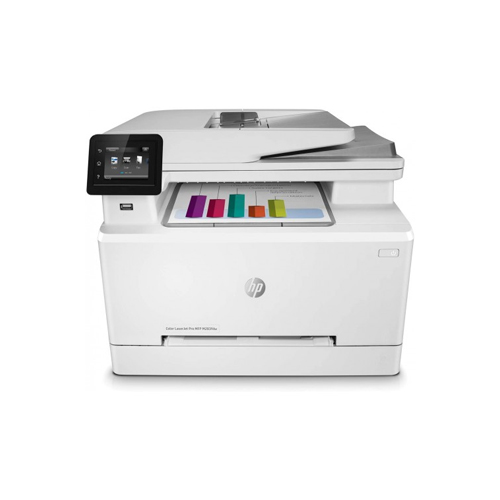
HP Color LaserJet Pro M283fdw All in One Printer

HP Color LaserJet Pro M283fdw All in One Printer
Out Of Stock
HP Color LaserJet Pro M283fdw All in One Printer
  • Stock: Out Of Stock
  • Model: M283fdw
0৳
Key Features
  • 2.7-inch color graphic touchscreen
  • Printer Type: Multi function Color Laser Printer
  • Processor: 800 MHz
  • Memory: 256MB
অভ্যন্তরীণ বাজারদরের সাথে সামঞ্জস্য রেখে পণ্যের মূল্য নির্ধারণ ও পরিবর্তন হতে পারে। ব্র্যান্ড, মডেল ও ফিচারের উপর ভিত্তি করে দামে পার্থক্য দেখা যায়। বিস্তারিত জানতে আমাদের হটলাইনে কল করুন: +880 2223-374695।
Specification
General
Functions Print, Scan, Copy, Fax
Output Color Color
Printer Type Multi function Color Laser Printer
Paper Information
Input Capacity 1 sheet in Tray 1; Up to 250 sheets (25 mm stack height) in Tray 2
Output Capacity Up to 100 sheets (10 mm stack height)
Paper Size Media size (ADF): A4
Executive (184 x 267 mm); Oficio 8.5x13 (216 x 330 mm); 4 x 6 (102 x 152 mm); 5 x 8 (127 x 203 mm); A4 (210 x 299 mm); A5 (148 x 210 mm); A6 (105 x 148 mm); B5(JIS) (182 x 257 mm); B6(JIS) (128 x 182 mm); 10 x 15cm (100 x 150 mm); Oficio (216 x 340 mm); 16K (195 x 270 mm; 184 x 260 mm; 197 x 273mm); Postcard(JIS) (100 x 147 mm); Double Postcard(JIS) (147 x 200 mm); Envelope #10 (105 x 241 mm); Envelope Monarch (98 x 191 mm); Envelope B5 (176 x 250 mm); Envelope C5 (162 x 229 mm); Envelope DL (110 x 220 mm); A5-R (210 x 148 mm)
Paper Type Paper (bond, brochure, coloured, glossy, heavy, letterhead, light, photo, plain, preprinted, prepunched, recycled, rough), transparencies, labels, envelopes, cardstock
Paper Weight 60 to 163 g/m² (Uncoated/Matte, recommended), however up to 175 g/m² Postcards and 200 g/m² HP Matte is allowed in the driver; 60 to 163 g/m² (Coated/Glossy, recommended), however up to 175 g/m² Postcards and 220 g/m² HP Glossy is allowed in the driver.
Scan
Scan Resolution Up to 300 x 300 dpi (colour and monochrome ADF); Up to 1200 x 1200 dpi (Flatbed) 8-bit (mono); 24-bit (color)
Scan Type Contact Image Sensor (CIS) 26 ppm (B), 23 ppm (C)
Technical Specs
Display 2.7-inch color graphic touchscreen
Memory 256MB
Power Consumption 110-volt input voltage: 110 to 127 VAC (+/- 10%), 50 Hz (+/- 3 Hz), 60 Hz (+/- 3 Hz); 220-volt input voltage: 220 to 240 VAC (+/- 10%), 50 Hz (+/- 3 Hz), 60 Hz (+/- 3 Hz)
Processor 800 MHz
Print
Duplex Automatic (standard)
Duty Cycle up to (Yield) 40000 Pages
Print Speed Print speed, black (normal): Up to 22 ppm
Print speed, color (normal): Up to 22 ppm
Technology Laser
Copy
Copy Resolution Up to 600 x 600 dpi
Copy Speed Copy speed (color, normal): Up to 21 cpm
Copy speed (black, normal): Up to 21 cpm
Physical Specification
Colors White
Dimension 419.1 x 421.64 x 335.28mm
Weight 18.69kg
Connectivity LAN
Built-in Fast Ethernet 10/100/1000 Base-TX network port; 802.11n 2.4/5GHz wireless; Fax port;
Wi-Fi
Built-in 802.11 b/g/n; Authentication via WEP, WPA/WPA2, or 802.1X; Encryption via AES or TKIP; WPS; Wi-Fi Direct
USB
Hi-Speed USB 2.0 port;
Front Host USB
Warranty Information
Warranty 01-year
Description

HP Color LaserJet Pro M283fdw All in One Printer

The HP Color LaserJet Pro M283fdw is a high-performance all-in-one printer that offers a range of features to meet the needs of small to medium-sized businesses. This printer delivers fast and efficient printing, scanning, copying, and faxing capabilities, making it an excellent choice for offices that require a versatile and reliable printer.

The Color LaserJet Pro M283fdw is capable of printing up to 22 pages per minute in both colour and black and white, with a maximum print resolution of 600 x 600 dpi. It also has automatic duplex printing, which helps to save paper and reduce printing costs. This printer can handle a range of paper sizes, up to 8.5 x 14 inches, and has a maximum monthly duty cycle of up to 30,000 pages, making it suitable for businesses with moderate printing demands.

This all-in-one printer offers a range of paper handling options, including a 250-sheet input tray, a 50-sheet automatic document feeder, and a single-sheet multipurpose tray. The automatic document feeder makes it easy to scan, copy or fax multi-page documents, while the multipurpose tray allows you to print on a range of paper types, including envelopes, cardstock, and labels.

The Color LaserJet Pro M283fdw offers advanced scanning capabilities, including a 50-sheet automatic document feeder and a flatbed scanner with an optical resolution of up to 1200 x 1200 dpi. It also has a range of scanning features, including scan-to-email, scan-to-network folder, and scan-to-USB, which allows you to scan documents directly to a USB drive.

This all-in-one printer has built-in Wi-Fi connectivity, which allows you to print from anywhere in your office without the need for cables. It is also compatible with a range of mobile printing apps, including HP Smart app, Apple AirPrint, and Mopria Print Service. This means you can print directly from your mobile device, whether you're using an iOS or Android operating system.

The Color LaserJet Pro M283fdw is also designed with security in mind. It has a range of security features, including secure boot, firmware integrity checking, and run-time intrusion detection. It also has optional HP JetAdvantage Security Manager, which provides additional security features such as authentication and device management.

Quick Compare

Quick Compare

Comparison of M283fdw vs ZKP5808 vs iP 2770 vs P2506 which are most simmiler.
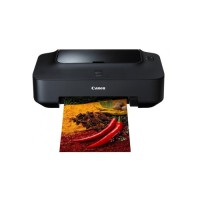
Product HP Color LaserJet Pro M283fdw All in One Printer ZKTeco ZKP5808 Portable Thermal POS Printer Canon Pixma iP 2770 Inkjet Printer Pantum P2506 Single Function Mono Laser Printer
Image HP Color LaserJet Pro M283fdw All in One Printer ZKTeco ZKP5808 Portable Thermal POS Printer Canon Pixma iP 2770 Inkjet Printer Pantum P2506 Single Function Mono Laser Printer
Price 0৳ 5,500৳ 5,190৳ 11,200৳ 8,400৳ 12,300৳ 10,000৳
Model M283fdw ZKP5808 iP 2770 P2506
Brand HP ZKTeco Canon Pantum
Availability Out Of Stock In Stock In Stock In Stock
Rating
Based on 1 reviews.

Based on 0 reviews.

Based on 2 reviews.

Based on 1 reviews.
Summary HP Color LaserJet Pro M283fdw All in One PrinterThe HP Color LaserJet Pro M283fdw is a high-performance all-in-one printer that offers a range of features to meet the needs of small to medium-sized businesses. This printer delivers fast and efficient printing, scanning, copying, and faxing capabilities, making it an excellent choice for offices that require a versatile and reliable printer.The Color LaserJet Pro M283fdw is capable of printing up to 22 pages per minute in both colour and black and white, with a maximum print resolution of 600 x 600 dpi. It also has automatic duplex printing, which helps to save paper and reduce printing costs. This printer can handle a range of paper sizes, up to 8.5 x 14 inches, and has a maximum monthly duty cycle of up to 30,000 pages, making it suitable for businesses with moderate printing demands.This all-in-one printer offers a range of paper handling options, including a 250-sheet input tray, a 50-sheet automatic document feeder, and a single-sheet multipurpose tray. The automatic document feeder makes it easy to scan, copy or fax multi-page documents, while the multipurpose tray allows you to print on a range of paper types, including envelopes, cardstock, and labels.The Color LaserJet Pro M283fdw offers advanced scanning capabilities, including a 50-sheet automatic document feeder and a flatbed scanner with an optical resolution of up to 1200 x 1200 dpi. It also has a range of scanning features, including scan-to-email, scan-to-network folder, and scan-to-USB, which allows you to scan documents directly to a USB drive.This all-in-one printer has built-in Wi-Fi connectivity, which allows you to print from anywhere in your office without the need for cables. It is also compatible with a range of mobile printing apps, including HP Smart app, Apple AirPrint, and Mopria Print Service. This means you can print directly from your mobile device, whether you're using an iOS or Android operating system.The Color LaserJet Pro M283fdw is also designed with security in mind. It has a range of security features, including secure boot, firmware integrity checking, and run-time intrusion detection. It also has optional HP JetAdvantage Security Manager, which provides additional security features such as authentication and device management... ZKTeco ZKP5808 Portable Thermal POS PrinterThe ZKTeco ZKP5808 Portable Thermal POS Printer is a compact and efficient thermal printing solution designed for high-performance point-of-sale (POS) systems. Engineered to meet the needs of mobile and on-the-go businesses, this printer is lightweight, weighing only 450 grams, and offers exceptional portability without compromising on functionality. The printer boasts a print speed of 90 mm/sec, ensuring rapid and high-quality receipts with minimal wait time. This thermal printer supports a 48mm print width and utilizes ESC/POS command sets for seamless integration with a variety of POS systems. It can print characters in 12x24 or 24x24 fonts, and has a total of 384 dots per line, delivering sharp and clear text. It’s also capable of printing QR codes and barcodes, making it highly versatile for modern retail and service environments. One of the standout features of the ZKP5808 is its auto-cutter functionality, which automatically cuts receipts after printing, improving efficiency and workflow. The printer also includes built-in auto-sleep and auto-awake capabilities, ensuring energy-saving when not in use, and longer battery life with a 7.4V DC 1500mAh battery that can last up to 4-5 days on standby, with continuous printing capability for up to 120 receipts when fully charged. With compatibility across Windows, Android, and iOS platforms, the ZKTeco ZKP5808 can easily interface with a wide range of devices. The external charging mode (9V/1.5A) ensures quick recharging, making this printer ideal for busy environments where downtime needs to be minimized. It is also designed for use in a variety of conditions, with the ability to function in temperatures ranging from -10°C to 50°C and humidity levels from 10% to 90%. Backed by a 1-year warranty, the ZKTeco ZKP5808 provides reliable, efficient, and mobile thermal printing that meets the demands of modern POS transactions.ZKTeco ZKP5808 Portable Thermal POS Printer FeaturesHigh-Speed Printing: With a print speed of 90 mm/sec, it ensures quick and efficient printing of receipts and other documents.Auto-Cutter: The printer is equipped with an auto-cutter that automatically cuts printed receipts, improving workflow and productivity.Low Noise: Despite its high-speed printing, the ZKP5808 operates with minimal noise, ensuring a quieter work environment.Compatibility: It supports multiple platforms, including Windows, Android, and iOS, making it versatile and easy to integrate with various POS systems.Support for QR Codes and Barcodes: The printer can print both QR codes and barcodes, providing versatility for modern retail and service applications.Battery-Powered: It features a 7.4V DC/1500mA battery that allows for 4-5 days of standby time and can print up to 120 receipts on a full charge, making it ideal for mobile and on-the-go use.Compact and Lightweight: Weighing only 450 grams and with dimensions of 105 x 75 x 45 mm, the ZKP5808 is highly portable and easy to carry around.Durability: The printer is designed to operate in a range of conditions, with an operational temperature range of -10°C to 50°C and humidity tolerance of 10% to 90%.High-Quality Printing: With a 384-dot/line resolution and support for multiple character sizes and fonts, it ensures crisp and clear text for receipts and other printed materials.Energy-Saving Features: Equipped with auto-sleep and auto-awake functions, the printer conserves battery life when not in use.External Charging: The printer can be charged via an external 9V/1.5A charger, ensuring quick recharging between uses.Warranty: The ZKTeco ZKP5808 comes with a 1-year warranty, offering added peace of mind... Canon Pixma iP 2770 Inkjet Printer The Canon Pixma iP 2770 Inkjet Printer is one of the most trusted and budget-friendly printers in Bangladesh, perfect for users who need a blend of quality, speed, and durability. If you are specifically searching for the canon pixma ip 2770 inkjet printer price in bd, this model continues to be a top choice for students, home users, and small offices due to its consistent performance and affordable running cost. Whether you’re printing daily assignments, photos, or office documents, this printer delivers professional-grade results without breaking the bank. The compact design makes it easy to fit on any desk, while the high-precision print head ensures crisp text and vibrant images every time. With a maximum resolution of 4800 × 1200 dpi, the Pixma iP 2770 produces sharp graphics and lifelike photos—ideal for creative projects or personal printing needs. Its fast print speed keeps your workflow smooth, and the ink system is designed to maintain low printing expenses, especially when paired with a continuous ink supply setup. The simple USB connectivity ensures smooth plug-and-print usability for all users, even beginners. If you're trying to compare models or understand the canon pixma ip 2770 inkjet printer price in bd, you’ll find this printer stands out with unbeatable value, reliable output, and long-lasting performance at a highly competitive price point. Smart Advantages Canon Pixma iP 2770 Inkjet Printer High-Quality Print Output: The printer delivers crisp, clear, and vibrant prints with up to 4800 × 1200 dpi resolution—perfect for documents, photos, and project prints. Fast & Efficient Printing: With a quick 7.0 ipm (black) and 4.8 ipm (color) print speed, it is ideal for both home and office workloads. Borderless Photo Printing: Print stunning borderless photos up to A4 size—great for creative projects and photo labs on a budget. Simple USB 2.0 Connectivity: A stable USB connection ensures faster data transfer and smooth printing. Affordable Maintenance & Ink Cost: Compatible with economical Canon ink cartridges and continuous ink systems (CISS), helping reduce long-term printing costs. Explore more options to find the perfect match for your needs. You can also check the Canon Pixma G1010 Refillable Ink Tank Printer as a reliable alternative with excellent print quality. For broader browsing, visit our Networking category or explore the Latest Printer Collection to discover more updated models. Click the links to compare features and choose according to your budget. Best Deal Awaits – Get Your Canon Pixma iP 2770 from Onix BD Looking for the best deal on the Canon Pixma iP 2770 Inkjet Printer? Check the most competitive canon pixma ip 2770 inkjet printer price in bd at Onix BD—your trusted source for genuine printers, fast delivery, and unbeatable value. Grab it now before the offer ends!.. Pantum P2506 Single Function Mono Laser Printer Finding a fast, durable, and cost-efficient mono laser printer can be challenging, especially when you need something suitable for both home and office use. If you’re researching the Pantum P2506 printer price in Bangladesh, this model stands out as a powerful yet budget-friendly option. The Pantum P2506 Single Function Mono Laser Printer is highly appreciated for its compact design, strong build quality, and impressive page-per-minute performance. Whether you’re a student printing assignments, a freelancer handling project documents, or a business owner dealing with daily office files, this printer ensures consistent results without increasing your printing expenses. With its 22 ppm speed, sharp 1200 × 1200 dpi output, and low-cost toner system, the Pantum P2506 is designed to deliver professional-quality prints in every situation. Users in Bangladesh particularly like its smooth USB connectivity, simple installation process, and long-lasting components that reduce maintenance hassle. For small spaces, its compact size is a major advantage—you get powerful printing performance in a minimal footprint. If you’re comparing models and checking the Pantum P2506 printer price in Bangladesh, you’ll notice its value stands out for the features it offers. Its reliability, user-friendly features, and efficient printing system make it a smart choice for anyone wanting high-quality mono printing at an affordable cost. Benefits of Pantum P2506 Mono Laser Printer Fast and Efficient Printing: The Pantum P2506 can print up to 22 pages per minute, ensuring your documents are ready quickly. This speed is ideal for office work, business reports, and frequent daily printing. Crisp & Professional Output: Its 1200 × 1200 dpi resolution delivers clean, dark, and professional-quality mono prints—perfect for important documents and business use. Compact & Space-Saving Design: With a sleek, minimal look, the printer fits perfectly on any desk. Small office, home workspace, shop counter—anywhere it sits nicely without taking up extra space. Low-Cost Per Page: Pantum printers are known for their budget-friendly toner cost. The P2506 model supports cost-effective cartridges, helping users print more while saving money. Easy USB Connection: Just plug and print. No complications. Suitable for all types of users—beginners to professionals. If you want the same powerful performance with wireless printing, check out the Pantum P2506W Single Function Mono Laser Printer. It delivers the same fast print speed and crisp output, plus the convenience of Wi-Fi connectivity—perfect for home and office users who prefer cable-free printing. Looking for more options? Browse our Office Equipment collection for essential workplace tools, or explore Find Your Ideal Printer Here to discover more printers tailored to your needs—whether it’s for home study, business use, or professional work. Why Buy the Pantum P2506 from Onix BD? Choose the Pantum P2506 Single Function Mono Laser Printer from Onix BD to enjoy authentic products, reliable after-sales support, and the best price in Bangladesh. If you’re searching for the most trusted place to check the Pantum P2506 printer price in Bangladesh, Onix BD ensures fast delivery, genuine Pantum warranty, and a smooth overall shopping experience—making it the smart and reliable choice for your next printer purchase...
Product Review

Write a review

Note: HTML is not translated!
Bad Good

Questions

Have question about this product? Get specific details about this product from expert.

No questions have been asked about this product.

Tags: