



Your compare list is empty!

Compare Product (0)
closeYour compare list is empty!
YOUR CART
closeYour shopping cart is empty!
| Frequency | 5 GHz, 2.4 GHz |
| Network Standard | Wi-Fi 5 IEEE 802.11ac/n/a 5 GHz IEEE 802.11n/b/g 2.4 GHz |
| Encryption | WPA/WPA2, WPA-PSK/WPA2-PSK/WPA3-SAE encryptions |
| Ports | 1× Gigabit WAN Port 4× Gigabit LAN Ports |
| Others | Processor: 1.2 GHz CPU |
| Data Rate | AC1200 5 GHz: 867 Mbps (802.11ac) 2.4 GHz: 400 Mbps (802.11n) |
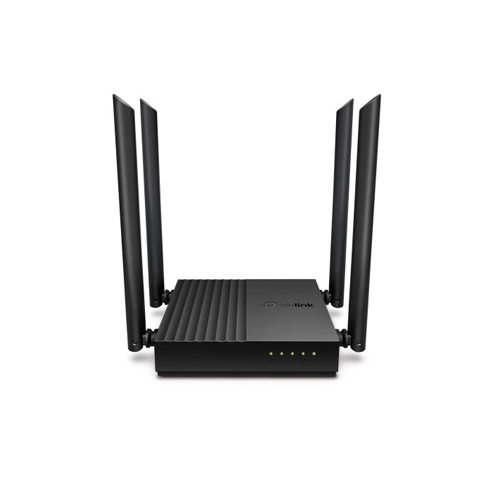
| Antenna | 4× Fixed High-Performance Antennas |
| Button | WPS/Reset Button |
| Dimension | 4.7 × 4.7 × 1.1 in (120 × 120 × 27.9 mm) |
| Color | Black |
| Warranty | 1 year |
The TP-Link Archer C64 AC1200 wireless router is a top-of-the-line networking device that delivers fast, reliable connectivity for homes and small businesses. With dual-band support and MU-MIMO technology, this router can handle multiple devices at once, making it perfect for busy households with multiple users.
The Archer C64 boasts speeds of up to 1200Mbps, thanks to its advanced 802.11ac Wave2 Wi-Fi standard. This means you can stream HD video, play online games, and download large files with ease, all without experiencing buffering or lag. And with dual-band support, you can choose between the 2.4GHz and 5GHz frequency bands, depending on your needs. The 2.4GHz band is ideal for everyday web browsing, while the 5GHz band provides faster speeds for more demanding applications.
MU-MIMO (Multi-User Multiple Input Multiple Output) technology ensures that each user gets a dedicated connection to the router, rather than sharing bandwidth with other users. This means that everyone in your household can enjoy high-speed internet simultaneously, without any slowdowns or interruptions.
In addition to its impressive performance, the Archer C64 also offers a range of features designed to make your life easier. For example, it comes equipped with four Gigabit Ethernet ports, which allow you to connect wired devices like gaming consoles or smart TVs directly to the router. There's also a USB 2.0 port, which lets you share files and media over your network, as well as a WPS button for easy setup.
Setting up the Archer C64 is a breeze thanks to TP-Link's intuitive Tether app, which guides you through the process step by step. You can also use the app to manage your network settings and monitor usage, giving you full control over your home network.
TP-Link
 0 Reviews

TP-Link


 Facebook
 WhatsApp